
#P9605. [IOI 2023] 机器人比赛

[IOI 2023] 机器人比赛
Background
This is an interactive problem. You only need to implement the functions required in the code.
Your code does not need to include any additional header files, nor do you need to implement the main function.
This problem only supports C++ submissions.
Due to some technical reasons, you may need to add the following content at the beginning of your source code:
#include <vector>

void program_pulibot();
void set_instruction(std::vector<int> S, int Z, char A);
Problem Description
AI researchers at the University of Szeged are holding a robot programming contest. Your friend Hanga decided to participate. Since the famous Hungarian sheepdog breed Puli is very smart, the goal of the contest is to program a top-level Pulibot.
The Pulibot will be tested in a maze consisting of an grid. The rows of the grid are numbered from north to south as to , and the columns are numbered from west to east as to . We call the cell in row and column (, ) cell .
Consider a cell (, ). It has adjacent cells:
- Cell is called the west neighbor of cell .
- Cell is called the south neighbor of cell .
- Cell is called the east neighbor of cell .
- Cell is called the north neighbor of cell .
If or or or holds, then cell is called the boundary of the maze. Each cell that is not on the boundary of the maze is either an obstacle or empty. In addition, each empty cell has a color, represented by a non-negative integer between and , including and . Initially, the color of each empty cell is .
For example, consider a maze with , , containing one obstacle cell .

The only obstacle cell is marked with . Boundary cells of the maze are shaded. The number in each empty cell indicates its color.
A path of length () from cell to cell is a sequence of empty cells , where all empty cells in the sequence are pairwise distinct. For each (), cells and are adjacent.
Note that a path of length contains exactly cells.
In the contest, the researchers prepared a maze in which there is at least one path from cell to cell . Note that this means cells and are guaranteed to be empty.
Hanga does not know which cells in the maze are empty and which are obstacles.
Your task is to help Hanga program the Pulibot so that it can find a shortest path (i.e. a path of minimum length) from cell to cell in the unknown maze prepared by the researchers. The Pulibot specification and contest rules are described below.
Note that the last part of the statement describes a display tool that can be used to visualize the Pulibot.
Pulibot Specification
For each cell (, ), its state is defined as an integer as follows:
- If cell is a boundary cell, then its state is .
- If cell is an obstacle, then its state is .
- If cell is empty, then its state is the color of the cell.
The Pulibot program is executed step by step. In each step, the Pulibot recognizes the states of nearby cells and then executes one instruction. The instruction it executes depends on the recognized states. A more precise description follows.
Suppose that at the beginning of the current step, the Pulibot is in cell , which is an empty cell. The step is performed as follows:
- First, the Pulibot recognizes the current state array, i.e. the array , which contains the states of cell and all its adjacent cells:
- is the state of cell .
- is the state of the west neighbor.
- is the state of the south neighbor.
- is the state of the east neighbor.
- is the state of the north neighbor.
- Then, the Pulibot determines the instruction corresponding to the recognized state array.
- Finally, the Pulibot executes this instruction: it sets the color of cell to , and then performs action , where is one of the following:
- Stay in cell .
- Move to one of the neighboring cells.
- Terminate the program.
For example, consider the situation shown on the left in the figure below. The Pulibot is currently in cell , with color . The Pulibot recognizes the state array . The Pulibot may have a program that, based on the recognized array, sets the color of the current cell to , and then moves east, as shown in the middle and right parts of the figure:

Robot Contest Rules
- At the start, the Pulibot is placed in cell and begins executing its program.
- The Pulibot is not allowed to move to a non-empty cell.
- The Pulibot program must terminate after at most steps.
- After the Pulibot program terminates, the coloring of empty cells in the maze satisfies the following:
- There exists a shortest path from to such that the color of every cell on the path is .
- All other empty cells have color .
- The Pulibot may terminate its program in any empty cell.
For example, the figure below shows a possible maze with . The left side shows the initial configuration, and the right side shows one acceptable coloring of the empty cells after the program terminates:
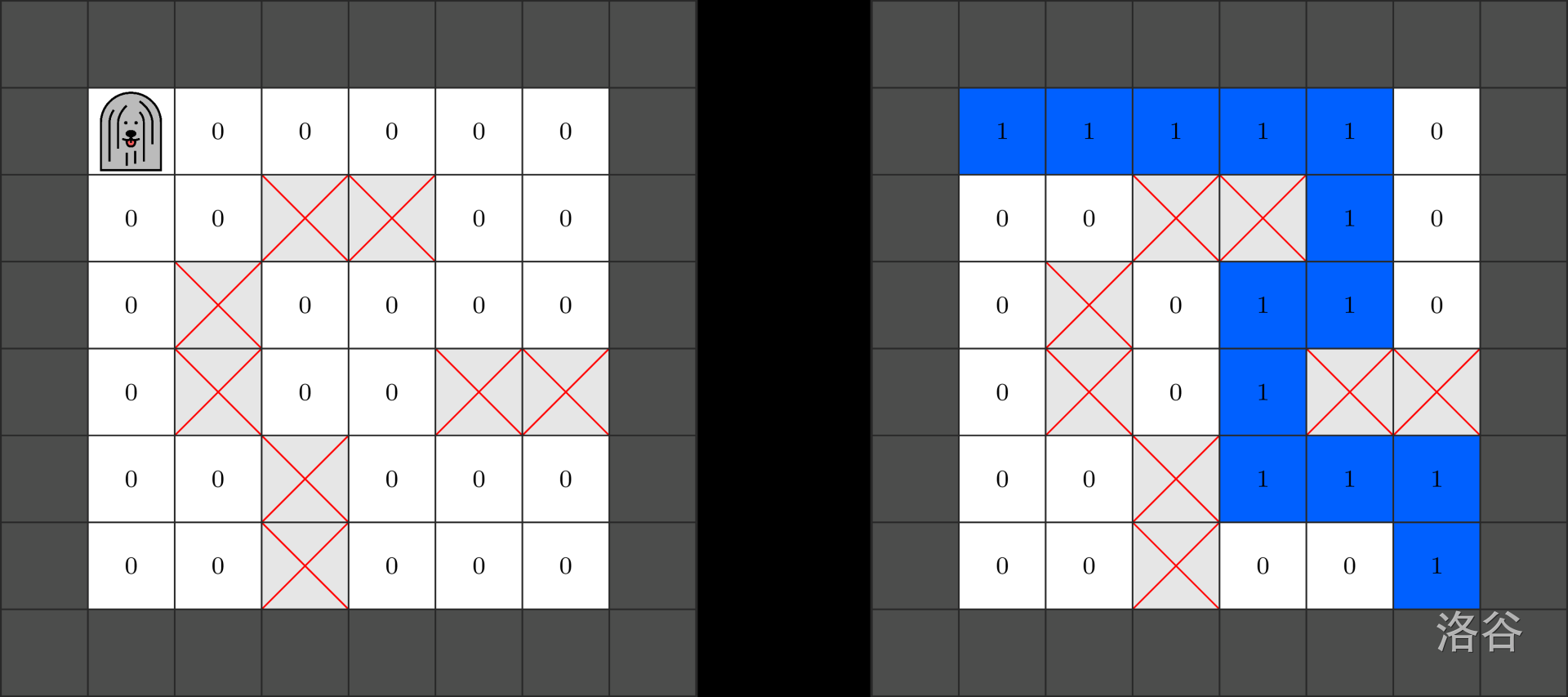
Input Format
You need to implement the following function:
void program_pulibot()
- This function should generate the Pulibot program. The program should work correctly for all values of and and for any maze that satisfies the constraints.
- For each test case, this function is called only once.
This function may call the following function to generate the Pulibot program:
void set_instruction(int[] S, int Z, char A)
- : an array of length , used to describe the state array.
- : a non-negative integer representing a color.
- : a single character representing the Pulibot action, as follows:
H: stay.W: move to the west neighbor.S: move to the south neighbor.E: move to the east neighbor.N: move to the north neighbor.T: terminate the program.
- Calling this function instructs the Pulibot which instruction it should execute when it recognizes the state array .
Calling this function multiple times with the same state array will result in Output isn't correct.
You do not need to call set_instruction for every possible state array . However, if the Pulibot later recognizes a state array for which no instruction was set, you will get Output isn't correct.
After program_pulibot finishes, the grader will run the Pulibot program on one or more mazes.
These runs are not counted toward the time limit of your solution.
The grader is not adaptive, i.e. the set of mazes for each test case is fixed in advance.
If the Pulibot violates any of the robot contest rules before terminating its program, you will get Output isn't correct.
Output Format
The function program_pulibot may call set_instruction as follows:
| Call | Instruction for the corresponding state array |
|---|---|
set_instruction([0, -2, -1, 0, -2], 1, E) |
Color and move east. |
set_instruction([0, 1, -1, 0, -2], 1, E) |
|
set_instruction([0, 1, 0, -2, -2], 1, S) |
Color and move south. |
set_instruction([0, -1, -2, -2, 1], 1, T) |
Color and terminate the program. |
Consider a setting with , , and the maze shown below.
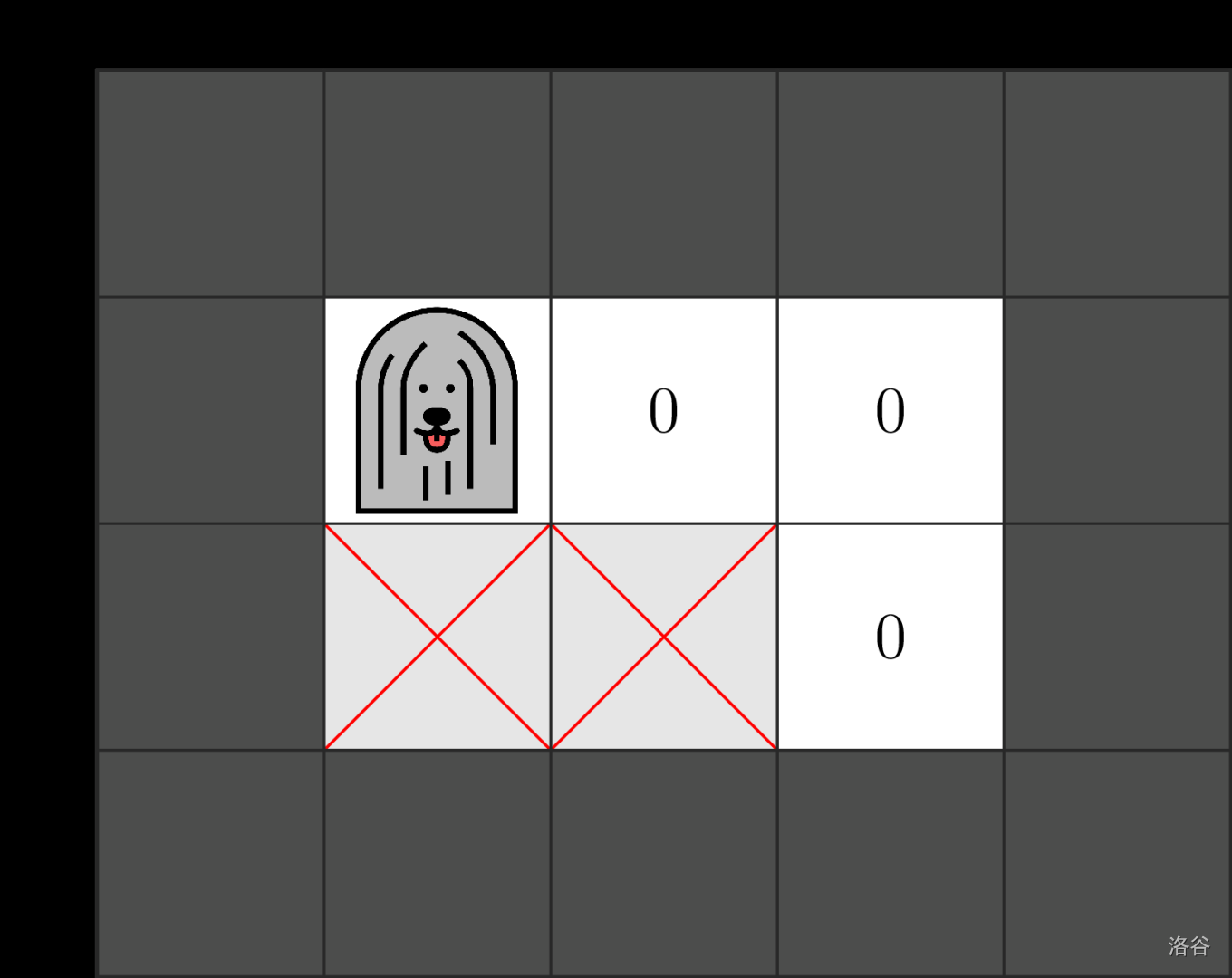
For this particular maze, the Pulibot program runs in four steps. The state arrays recognized by the Pulibot and the instructions it executes correspond exactly, in order, to the four calls to set_instruction above. The last of these instructions terminates the program.
The figure below shows the maze before each of the four steps, and the final colors after termination.

However, note that this program of instructions may fail to find a shortest path in other valid mazes.
Therefore, if this program is submitted, it will receive Output isn't correct.
Hint
Constraints
. Therefore, the Pulibot can use colors from to , including and .
For each maze used to test the Pulibot:
- .
- There is at least one path from cell to cell .
Subtasks
- (6 points) The maze has no obstacle cells.
- (10 points) .
- (18 points) Between any two empty cells, there is exactly one path.
- (20 points) The length of the shortest path from cell to cell is .
- (46 points) No additional constraints.
If, in any test case, the calls to set_instruction or the execution of the Pulibot program do not satisfy the restrictions described in “Implementation Details”, then the score of the solution for that subtask will be .
In each subtask, you can obtain partial points by generating an almost correct coloring.
Formally:
- If the final colors of empty cells satisfy the robot contest rules, then the solution for the test case is full.
- If the final coloring is as follows, then the solution for the test case is partial:
- There exists a shortest path from to such that the color of every cell on the path is .
- There are no other empty cells with color in the grid.
- Some empty cells in the grid have colors that are neither nor .
If your solution for a test case is neither full nor partial, then the score for that test case is .
In subtasks 1-4, for each test case, a full solution is worth 100% of the subtask points, and a partial solution is worth 50% of the subtask points.
In subtask 5, your score depends on the number of colors used in the Pulibot program.
More precisely, let be the maximum value of among all calls to set_instruction.
The score for a test case is computed according to the table below:
| Condition | Score (full) | Score (partial) |
|---|---|---|
The score of each subtask is the minimum score among all test cases in that subtask.
Sample Grader
The sample grader reads input in the following format:
- Line : .
- Line (): .
Here, is a 2D integer array with rows and columns, describing the non-boundary cells of the maze. If cell is empty, then . If cell is an obstacle, then .
The sample grader first calls program_pulibot(). If the sample grader detects any rule violation, it prints Protocol Violation: <MSG> and terminates, where <MSG> is one of the following error messages:
Invalid array: does not hold for some , or the length of is not .Invalid color: does not hold.Invalid action: the character is not one ofH,W,S,E,N,T.Same state array:set_instructionwas called two or more times with the same .
Otherwise, when program_pulibot finishes, the sample grader runs the Pulibot program in the maze described by the input.
The sample grader produces two outputs. First, it writes a log of Pulibot actions into the file robot.bin in the working directory.
This file is used as input for the visualization tool described in the next section.
Second, if the Pulibot program does not terminate successfully, the sample grader prints one of the following error messages:
Unexpected state: the Pulibot recognized a state array for whichset_instructionwas not called.Invalid move: an action was executed that caused the Pulibot to move to a non-empty cell.Too many steps: the Pulibot executed steps without terminating.
Otherwise, let be the state of cell after the Pulibot program terminates. The sample grader prints lines in the following format:
- Line (): .
Display Tool
The attachments for this task include a file named display.py.
When called, this Python script displays the Pulibot's actions in the maze described by the sample grader input.
To do so, the working directory must contain the binary file robot.bin.
To call the script, run the following command.
python3 display.py
A simple GUI will appear, with the following main features:
- You can observe the state of the entire maze. The current position of the Pulibot is highlighted with a rectangle.
- You can browse the Pulibot steps by clicking the arrow buttons or using hotkeys. You can also jump to a specific step.
- The next step to be executed by the Pulibot program is shown at the bottom.
It shows the current state array and the instruction to be executed.
After the last step, it will either show one of the grader error messages, or show
Terminatedif the program terminated successfully. - For each number representing a color, you can specify the background color and the displayed text. The displayed text is a short string that should appear in each cell with that color. You can specify the background color and displayed text in either of the following ways:
- Set them in a dialog window after clicking the
Colorsbutton. - Edit the contents of the
colors.txtfile.
- Set them in a dialog window after clicking the
- To reload
robot.bin, use theReloadbutton. This can be used when the contents ofrobot.binchange.
Translated by ChatGPT 5