

[CEOI 2024] 文本编辑器
Problem Description
This problem is translated from CEOI 2024 Day 1 T3「Text editor」.
Robert is participating in the CEOI 2024 programming contest. He has almost finished the code for the hardest problem of the day, and he is sure he will get a full score. But there is a tiny detail: he mistyped one character. Even worse, his beloved mouse, which he has used since 2008, has completely stopped working and does not respond at all. Therefore, he can only use the arrow keys on the keyboard to move the cursor to find that typo.
Robert's program has lines, with lengths . Robert always ends the program with an empty line, so . The cursor can be placed between two characters, and also at the beginning or end of a line. Therefore, line has available cursor positions (called columns), numbered from to . For example, the following shows the cursor at line , column :
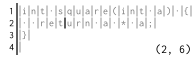
Robert wants to move the cursor from column in line to column in line . He wants to find the minimum number of key presses needed.
Using the horizontal arrow keys is simple. Pressing Left moves the cursor to the previous column, unless the cursor is at the beginning of a line, in which case it moves to the end of the previous line. Similarly, pressing Right moves the cursor to the next column, or if the cursor is at the end of a line, it moves to the beginning of the next line.
For example, Left can move like this:

And Right can move like this:

Pressing Left at the very beginning of the file, or pressing Right at the very end of the file, has no effect.
Using the vertical arrow keys is a bit more complicated. Pressing Up moves the cursor to the previous line, and pressing Down moves it to the next line, keeping the same column number. However, if this would place the cursor beyond the end of the new line, the cursor jumps to the end of that line.
For example, Up can move like this:

And Down can move like this:

If pressing Up or Down would move the cursor to a line that does not exist, then the cursor does not move at all.
Input Format
The first line contains an integer , the number of lines in Robert's program.
The second line contains two integers and separated by spaces, describing the initial cursor position.
Similarly, the third line contains two integers and separated by spaces, describing the target cursor position.
The fourth line contains integers separated by spaces, where is the length of line .
Output Format
Output one line containing an integer, the minimum number of key presses required to move the cursor from to .
5
3 1
2 8
7 10 9 9 0
3
5
1 20
3 25
25 10 40 35 0
16
Hint
Sample Explanation 1
Robert can move the cursor to the target position by pressing, in order, Up, Left, and Down:

Alternatively, he can press Left, Up, and Down to reach the target position just as fast.
Sample Explanation 2
It is easy to prove that it is impossible to reach the target position using at most two key presses.
The shortest possible key sequence is pressing Down twice and then pressing Right fourteen times.
For all input data, the following constraints hold:
- .
- .
- .
- .
- .
- .
The detailed additional constraints and scores for the subtasks are given in the table below.
| Subtask | Additional Constraints | Score |
|---|---|---|
| No additional constraints. |
Translated by ChatGPT 5